A Guide for Setting Up and Optimizing Live Video for Small Businesses

Live video streaming became a huge thing even before the pandemic hit the business and pushed owners to use virtual ways.

It’s a great way to connect with your customers and create a personal connection with them. This guide will show you how to set up and optimize LIVE video for your small business. We’ll discuss the different platforms that are available to you, as well as tips on how to create successful LIVE videos. Thanks for choosing our guide!

What is something you should know about LIVE streaming?

Live video feeds are everywhere these days and for a good reason. The medium’s visual nature allows you to see what your audience sees in real-time as they watch their favorite show or event happen live on TV! It also gives more chances to interact and connect with the viewers while doing the live stream.

There are different platforms where you get the options to set up your live video. However, depending on your choice, the length and features are also different. Some of the best platforms that you can consider are :
FB LIVE

Facebook Live

One of the most popular platforms due to its capacity to target more audiences, you can start your live streaming on Facebook.

You can use a phone or computer both for going live on Facebook. When you are live, you also appear on your group, page, and event.

Also, you might show up on your news feed and Facebook watch.

Using App :

  • If you are using a phone and app, here is how you can go live
  • Visit the form where you want to go live, it can be page, group, event, etc
  • Click on the live option, and you will find this to the bottom of your post composer
  • Now here you need to write the description, you can tag friends, locations, and collaborators.
  • Once you are done, you can click on start live video and the live broadcast will begin.
  • When you are ending the stream, click on finish.

Using built-in webcam :

If you are using the desktop and using the built-In webcam for this, you can follow these steps to set up.

  • Go to the live video icon that locates beneath the what’s up mind status.
  • Here you will be taken to the live producer tool and here you can choose the source of your video. Click On use camera.
  • Here on your left, write the description, add title, tag people, places or if it’s for donation, you can add that too.
  • Check if you go live, click on the button to start the live video

Using the messenger rooms :

This one works only If you are using chrome. Also to go live on messenger rooms here are steps for you :

  • Set your messenger room and run. Here you will get the live option in the corner of your right hand.
  • Give the title to the video, it’s optional.
  • Choose the forums where you want your video to go live. You can choose a page, group, or your time, etc.
  • Now choose your audience and click next.
  • Participants can leave or choose to confirm, you have the feature to remove participants if you want.
  • Click the Start and it will go live.
  • Once you are done, you can end the live sessions by clicking on the send button. 

PRO TIP: Check the connection, it should be strong before you go live. Respond to the comments that you get on videos and thank them. Make your description catchy to tell what the video is all about. Keep the background noise as low as you can.

Twitch

If you want to consider the live stream platform, especially for video gamers, this one is the most popular and one of the leading names.
Instagram Live

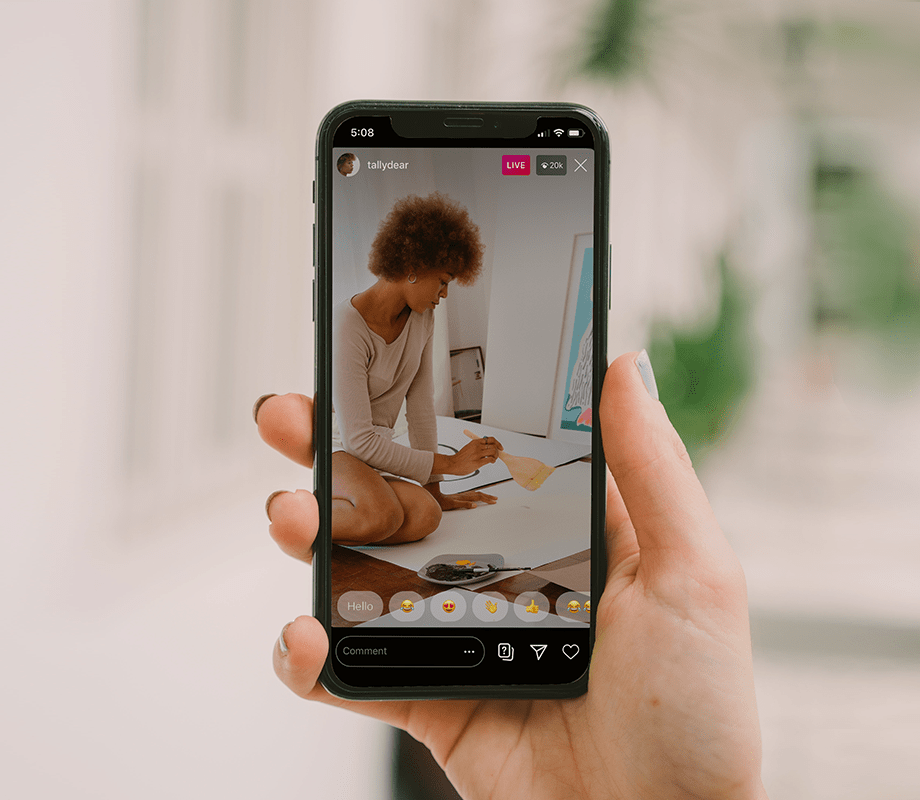
Well, Instagram Live is another option that is popular, easy, and simple for live streaming. It’s because of the app as they prioritize the live content more on their platform, and you don’t find this on Facebook.

Here is how you can set up for Instagram live :
  1. Swipe up to go to the Instagram stories. You can see the story’s camera, and there will be live options on your screen’s bottom. 
    Here you will see how many followers of yours are active.
  2. Make sure you are ready to go live. The app will take a few seconds to ensure that you have a
    connection and once it gets confirmed, the live stream begins.
IG LIVE

Well, when you are streaming, there will be access to some features that you can use :

  • Use the filters icon and it will apply the Instagram filters to your live. It can be fun and you can use it to make your life look better.
  • You can DM or Direct Message during your live stream, for that you require to use the message icon that is in the shape of a paper plane
  • If you want to share the question submitted by your audience, you can simply click on the question mark.
  • To comment back to your audience, you can use the comment box and type your comments.
  • If you want to add another host to your live stream, you can tap on two faces on your screen.
  • To share the image in your stream, you can use the camera roll.

PRO TIP: Test the live before you go for streaming. Give advance notification, use the stories to promote live stream. Choose a day or week and fix a time so the audience knows when they can participate again. Get someone with you, it can be a fan, business partner, or creator. Ask questions and do the Q & A session live. You can ask questions on stores and collect to answer on the live stream. Turn on your comment moderation. Save the live video and use the story to upload it.


YouTube Live

Youtube started their live streaming too, you can set up for this apart from posting the regular videos. The live broadcast also comes with other benefits, for example, it’s searchable on the platform. It means, it’s searchable for Google as well.

  • Make sure you have the verified channel on youtube.
  • Ensure that there is no restriction on you for doing live streams for the next 90 days.
  • To use the mobile option for streaming, you are going to need at least 10000 subscribers.

Here are a few steps that you need to consider to set up :

Using Desktop

  • Go to the dashboard
  • Click on the create button, you will get this one on the top right corner.
  • Choose to go live.
  • Well, it can take24 hours to get our account activated for live streaming.
  • Choose webcam
  • Add title and add privacy setting
  • Click on more options if you want to add subscription, monetization, chat, and promotions.
  • Now click next and it will automatically take a welcome photo in thumbnail. You can change or retake afterward.
  • Click on Go Live
  • When you want to end It, select the end stream

Using Mobile

  • Open your app
  • Click on the camcorder option on the top right.
  • Click on go live.
  • Add the title as well as do the privacy setting
  • Go to More option for adding the description, enabling or disabling the cat, monetization, age restriction , promotional disoliure etc.
  • Select Next to upload the thumbnail.
  • You can share the link on social media by clicking on Share.
  • Now choose to Go live.
  • To end, click on finish and choose ok.

Well the platform itself suggests what you can expect when you use it. You can share the videos through the internet, Apple, iOS, Android, etc.

To set up. Here are steps for you :

  • Log in to the Livestream producer
  • Open the program you want to share
  • Choose output source if you are taking video from another source
  • Click on save, however it will need the image to save it.

If you are using a desktop, click no camera.

  • Go live via the preview
  • If you want to limit the screen, choose zoom in. Click until you get the green brackets.
    The audience won’t see the screen beyond your choice.

PRO TIP: Test your setup before you decide to go live. Keep the bitrate as it should not have outbound bandwidth in excess amount. Use the network that can be reliable and check the internet connection. Use only professional hardware as well as software encoders.

I have a small business, should I consider LIVE videos?

Live streaming has become the next big thing that ever happened to the business industry. The power of live video gives businesses an opportunity for better customer engagement, enhancing their brand awareness and increasing morale among employees by giving them control over how they interact with customers directly from anywhere in any country at anytime on either desktop
or mobile devices without even having be physically present there! Live Streaming integration into marketing strategies can help you get wider audience interaction which result in building strong relationships through trustful connections between your company’s products/services & potential clientele.


Its Fastest-Growing Tool

Live video is one of the most popular tools that are growing fast for marketing purposes. 

There are so many platforms that are promoting live videos. Also, lots of businesses are finding ways to get their business start by using streaming.


Improve Your Brand Awareness

Live streaming is offering a huge advantage to the brands. As its boosting brand awareness by publicizing.

One of the things that keeps the video streaming apart from the rest is it’s real-time and richness
in nature.


It Helps In Understanding Customers

Live broadcasting is incredible when it comes to experimentation.
You can use this for understanding what your audience likes or interests on a much deeper level. When you do the live streaming on a regular basis, you can notice the difference. Some of tour live streaming will get a better response than the others.


It’s Cost-Effective

Well, for small businesses, this should be the best thing as you are saving so much money on advertising, if you are doing the live streaming like an expert.


It Helps In Establishing Trust

To become successful, it’s important that your brand holds the trust among the others.
Live streams are helpful and it provides transparency to the viewers. You can become the voice of your brand and show the side of your business through live streaming.

What should I Live stream about?

Broadcast Interviews & Testimonials
Launch Your Product
Show How The Business Works
Have Q&A Session
 

Share:

More Posts

Beyond Marketing Logo v3.0

GET STARTED NOW

สล็อต
สล็อต
https://reviewmydates.com/brands/
https://reviewmydates.com/brands/water-over-flow
สล็อตเว็บตรง
สล็อต
สล็อตทดลองเล่นฟรี
สล็อต123
สล็อต
สล็อต
สล็อต
สล็อต
สล็อต
reels on fire bonus codes
https://www.gialaitech.com/brand/
app996
opal96
viva96
mm96
สล็อตทดลองเล่น
เครดิตฟรี 50 ยืนยันเบอร์
สล็อตเว็บตรง 168
สล็อตเว็บตรง 100%
สล็อต 99
สล็อต123
สล็อต
สล็อต168
https://playsugar96.com/
supreme777
blaze007
roo96
prime96
aco96
xbet96
wewin96
gday96
app996
au21
pokiefox
fafawin
9pokies
สล็อต
บาคาร่า
บาคาร่า
สล็อต
สล็อต
ทดลองเล่นสล็อต
pg slot เว็บตรง
ทดลองเล่นสล็อตฟรี
สล็อต
บาคาร่า777
สล็อต
สล็อต
สล็อต
สล็อต
สล็อต
สล็อต168
สล็อต
สล็อตเว็บตรง
สล็อตเว็บตรง
สล็อต
สล็อต
สล็อต
สล็อต
สล็อต
สล็อต
สล็อต
บาคาร่า
สล็อต123
สล็อต
คาสิโนออนไลน์
คาสิโนออนไลน์
สล็อต789
บาคาร่า
สล็อต
สล็อต555
สล็อต999
สล็อต99
ทดลองเล่นสล็อต
สล็อต365
บาคาร่า
สล็อต
สล็อต789
สล็อต888
ทดลองเล่นสล็อต
สล็อตเว็บตรง100%
สล็อต
สล็อต
สล็อต
คาสิโนออนไลน์
สล็อต777
สล็อต888
สล็อต888
สล็อตเว็บตรง
บาคาร่า
บาคาร่า
บาคาร่า168
บาคาร่า
สล็อตทดลอง
สล็อต
สล็อต
ลองเล่นสล็อต
สล็อต
สล็อต289
สล็อต888
สล็อตเว็บตรง
สล็อตเว็บตรง
สล็อต
สล็อต
สล็อต888
สล็อต999
สล็อตเว็บตรง
สล็อตเว็บตรง
สล็อตเว็บตรง
สล็อต
สล็อต888
ทดลองเล่นสล็อต
ทดลองเล่นสล็อต
บาคาร่า
บาคาร่า
บาคาร่า
สล็อต
สล็อต
บาคาร่า
สล็อต
สล็อต123
สล็อต
สล็อตออนไลน์168
สล็อต
สล็อต
ทดลองเล่นสล็อต
เว็บทดลอง
สล็อต123
สล็อต123
สล็อต123
สล็อต
สล็อต777 pg
สล็อต777 pg
สล็อต777 pg
สล็อต777 pg
mrlucky9
roo96
winx96
bonus96
iplay77
au68
race96
victor96
roo96
สล็อต999
คาสิโน
pg
hype777
x4bet
retro33
aus68
mrspin9
gday9
aus96
สล็อต
ทดลองเล่นสล็อต
สล็อต123
aus96
bunny96
ทดลองเล่นสล็อต
บาคาร่า
บาคาร่า
บาคาร่า
บาคาร่า
บาคาร่า
บาคาร่า
เว็บสล็อต
สล็อต888
สล็อต999
สล็อต
สล็อตเว็บตรง
สล็อต123
สล็อตเว็บตรง
สล็อต123
สล็อต666
คาสิโน
สล็อต
สล็อตเว็บตรง
สล็อต168
สล็อต
ทดลองเล่นสล็อต
สล็อต
สล็อต
สล็อต123
789 สล็อต
เว็บสล็อต
เว็บสล็อต
สล็อต123
เว็บสล็อต
สล็อต999
สล็อต PG
สล็อต168
สล็อต999
สล็อต
สล็อตเว็บตรง
ทดลองเล่นสล็อต
สล็อต168
สล็อต789
สล็อต168
สล็อต789
สล็อต
สล็อต168
https://nzautocare.com.au/
https://thediasporaexchange.com.au/
ทดลองเล่นสล็อต
สล็อต123
ทดลองเล่นสล็อต
สล็อต888
สล็อต888
สล็อต888
สล็อต888
สล็อตเว็บตรง
เว็บพนัน
สล็อตทดลอง
สล็อต
ทดลองเล่นสล็อต
ทดลองเล่นสล็อต
ace4win
ทดลองเล่นสล็อต
สล็อต168
สล็อต666
สล็อตเว็บตรง
PG Slot
สล็อต123
pgสล็อต168
สล็อต
pgslot
สล็อต168
ทดลองเล่นสล็อต
สล็อตเว็บตรง
ทดลองเล่นสล็อต
ทดลองเล่นสล็อต
ทดลองเล่นสล็อต pg
สล็อต777
pg slot auto
สล็อต pg
ทดลองเล่นสล็อต
ทดลองเล่นสล็อต pg
pgสล็อต
เครดิตฟรี 50 กดรับหน้าเว็บ
สล็อต 888
สล็อต888
สล็อต
เกมสล็อต สล็อต 777 เว็บตรง
สล็อตเว็บตรง
สล็อตเว็บตรง
ทดลองเล่นสล็อต
ทดลองเล่นสล็อต
สล็อต789
ทดลองเล่นสล็อต
สล็อต789
สล็อต
สล็อต
สล็อต
สล็อต
สล็อต
สล็อต
สล็อต
สล็อต
สล็อต
สล็อต
สล็อต
สล็อต
สล็อตเว็บตรง
สล็อต
เว็ปสล็อต
789bet
สล็อต
สล็อต789
สล็อต123
สล็อต123
ทดลองเล่นสล็อต
ทดลองเล่นสล็อต pg
สล็อต168
https://www.gc-solutions.net/
betflik6789
สล็อต
คาสิโน
ทดลองเล่น pg
ufabet1688
hercules99
สล็อตทดลอง
havana88
https://saclab.com/
https://medinformer.co.za/d
https://zwilling.pl/
https://soporte.univim.edu.mx/
https://anugrahacollege.edu.in/
สล็อต999
https://eduwis.edu.my/
https://www.incn.gob.pe/
สล็อต
tkb138
สล็อตเว็บตรง
สล็อต999
สล็อตเว็บตรง
สล็อตเว็บตรง
สล็อตเว็บตรง
https://www.latestly.com/lifestyle/%e0%b8%97%e0%b8%94%e0%b8%a5%e0%b8%ad%e0%b8%87%e0%b9%80%e0%b8%a5%e0%b9%88%e0%b8%99%e0%b8%aa%e0%b8%a5%e0%b9%87%e0%b8%ad%e0%b8%95-pg-%e0%b8%a7%e0%b8%b4%e0%b8%98%e0%b8%b5%e0%b9%80%e0%b8%a5%e0%b9%88-7384688.html
สล็อตทดลอง
ทดลองเล่นสล็อต PG
สล็อตเว็บตรง
ทดลองเล่นสล็อตฟรี
สล็อตเว็บตรง
สล็อตเว็บตรง
ทดลองเล่นสล็อต PG
ทดลองเล่นสล็อต PG
ทดลองเล่นสล็อต
https://geobgu.xyz/contact/
สล็อตเว็บตรง100
ทดลองเล่นสล็อต PG
สล็อตเว็บตรง
สล็อตเว็บตรง
สล็อตเว็บตรง
สล็อต
สล็อตเว็บตรง
สล็อต
สล็อต
สล็อตเว็บตรง